CoreviaFlowCOREVIAFLOWDIGITAL PROJECT COMPANY Leave a request
EN UA RU
CRMUS

Freshsales integration & automation

The Freshworks sales CRM: contacts, deals and calls in one place, kept in step with your other systems

Freshsales keeps contacts, companies, deals, tasks and meetings together, and has its own phone built in. We connect it to your other systems so new clients arrive in the CRM on their own, calls land on the right card, and routine follow-ups are set up by the CRM instead of by a manager's memory.

What we connect

  • Contacts, companies and deals stay in sync with your other systems — a new client from a website form or another tool appears in Freshsales without anyone retyping it.
  • No duplicates: when a client comes in again, Freshsales finds the existing record and updates it, and only creates a new one if there is no match.
  • Tasks, notes and meetings can be created from outside too, so the next step with a client is written into the CRM where the team already works.
  • Freshsales has its own phone for making and taking calls in the browser; it can also be joined with Freshcaller, and a call made through another phone service can be logged on the client's card.
  • Built-in workflows react to what happens in the CRM: they update fields, send email alerts, create follow-up tasks and pass the news on to other systems right away.
  • Products and sales documents live in Freshsales as well, so the goods on a deal can come from your catalogue instead of being typed by hand.

Automation scenarios

01

A request comes in from the website

Before a manager copies the request into Freshsales by hand and sometimes creates the same client twice.

After the contact lands in Freshsales on its own, and if the client already exists, their card is updated instead.

02

A deal reaches a new stage

Before after moving a deal, the manager has to remember to warn the warehouse or accounts.

After a Freshsales workflow notices the change and passes it to the other system at once, with a follow-up task for the manager.

03

Calls go through a separate phone service

Before the team calls from another service, and Freshsales never learns that the conversation happened.

After each call is logged on the right contact's card, so the history is complete.

04

A reminder is needed on a set date

Before follow-ups before a contract date live in someone's notebook.

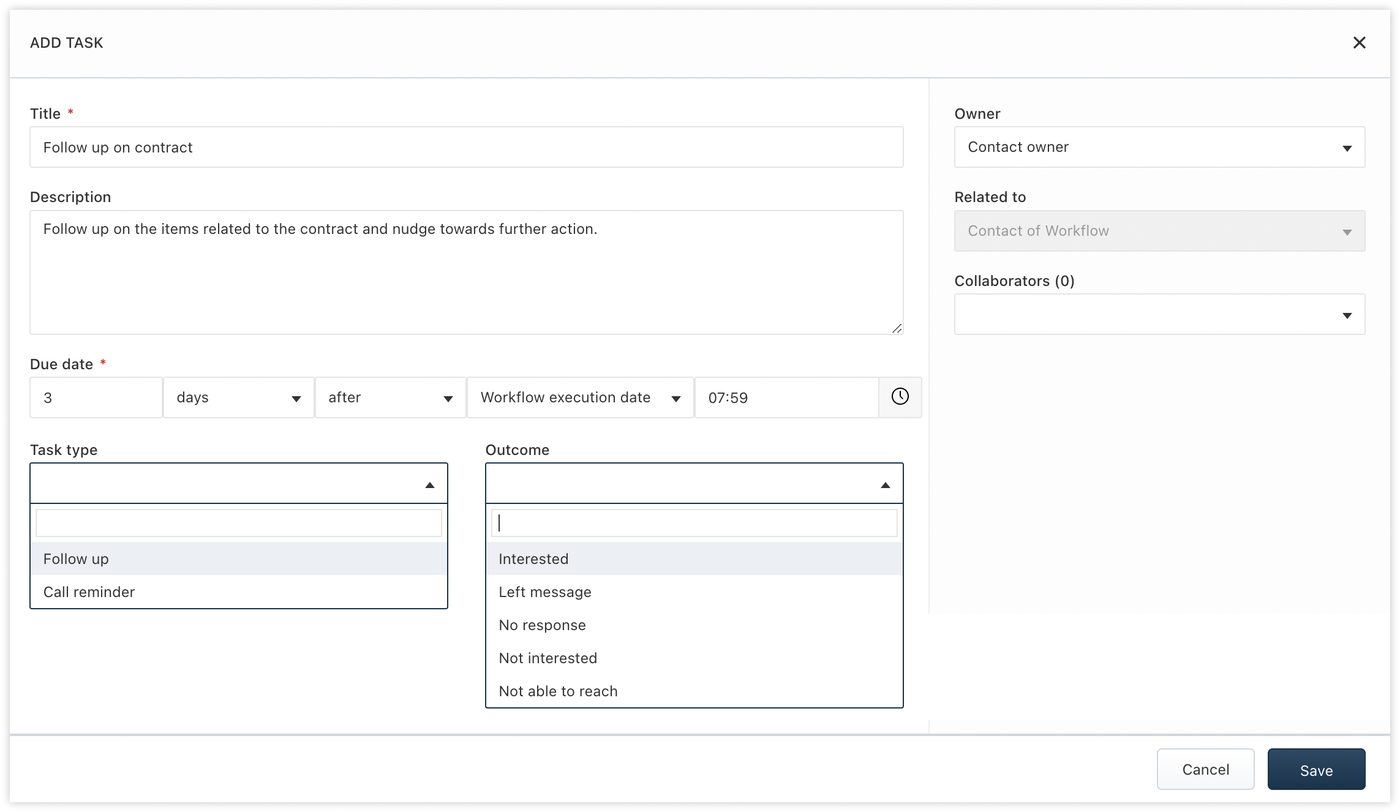
After on the Pro plan and up, a date-based workflow creates the task in Freshsales by itself when the time comes.


How it works technically

For those who want to check: each point links to the official documentation page it comes from.

Limits

Workflows that react to changes in a record are available from the Growth plan up, and date-based workflows only from the Pro plan up. The connection can make up to 1000 requests per hour per account, so very large imports are spread over time rather than done in one go.

Screenshots

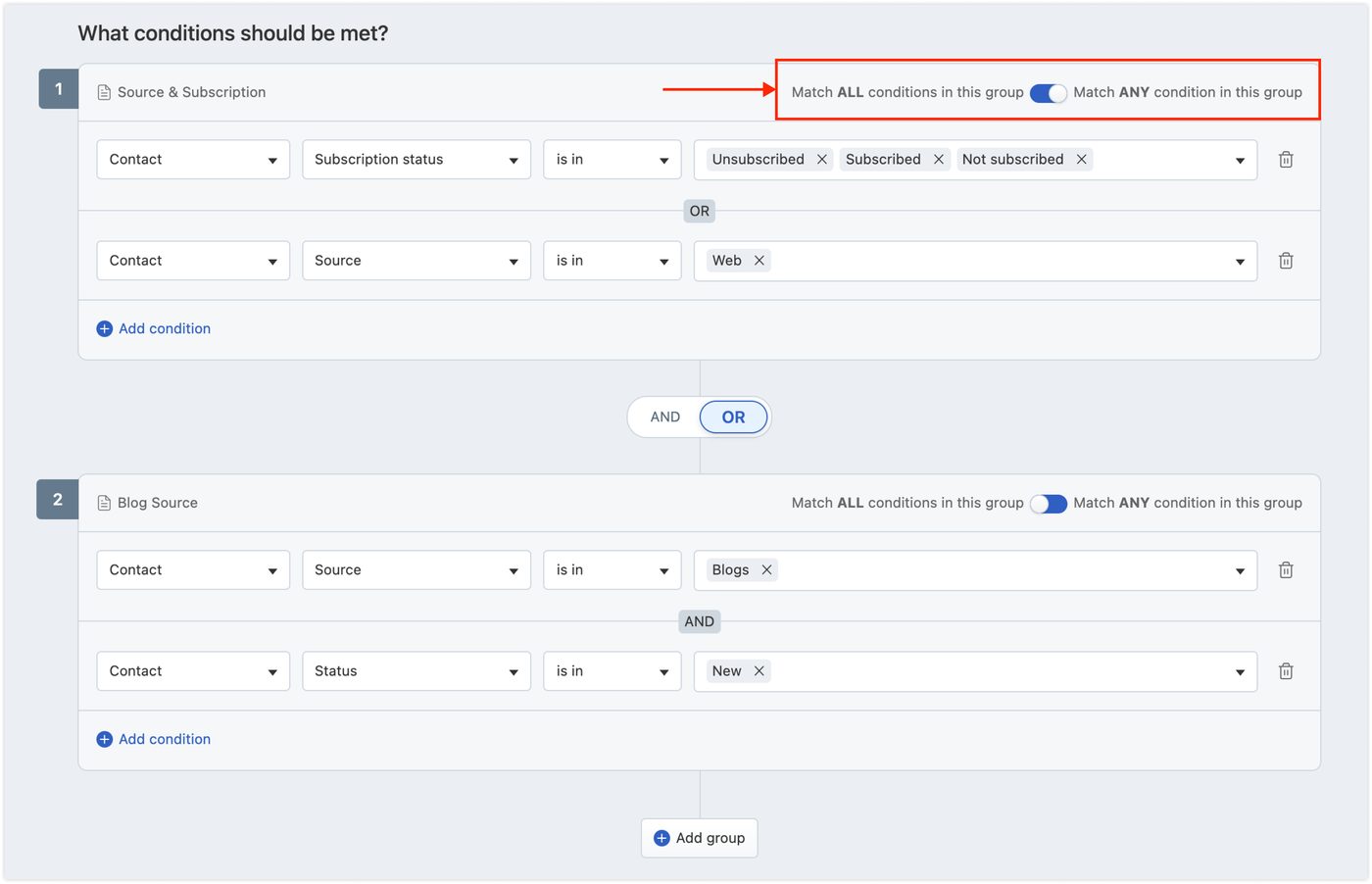
Freshsales workflow builder: groups of conditions on contact source, status and subscription
When a workflow should run Source: crmsupport.freshworks.com ↗
Freshsales workflow action: a follow-up task due three days after the workflow runs
A follow-up task set by the CRM Source: crmsupport.freshworks.com ↗

How to start

Three steps from a first message to work on your project.

  1. 01

    Leave a request

    Describe the task in the form — in text or by voice. Budget and timing are optional.

  2. 02

    We review and estimate

    A developer studies the brief, asks about anything unclear and sends an estimate.

  3. 03

    We start

    Once scope and price are agreed, the work begins.

or write to info@coreviaflow.space

Questions

Does Freshsales have its own phone?
Yes — calls can be made and taken right in the browser, and it can be joined with Freshcaller. If you use another phone service, the calls can still be logged on the client's card.
Will the same client end up in the CRM twice?
Freshsales can look for an existing record first and update it, creating a new one only when nothing matches.
Can Freshsales tell our other systems when something changes?
Yes — a workflow can pass the news to another system as soon as its conditions are met. Workflows on record changes need the Growth plan or higher.

Tell us what needs to be connected

Describe the task in text or a voice message. We look at your setup and reply with a plan.